Chapter 2: Nodes, Topics, Services, and Actions
Chapter 2: Nodes, Topics, Services, and Actions
Objective: Master the fundamental communication patterns in ROS 2 and learn how to inspect them from the command line.
2.1 The ROS 2 Graph and the Anatomy of a Node
The "ROS Graph" is the network of all the ROS 2 elements processing data together. It's best imagined as a dynamic web of independent programs that find and talk to each other. The core components of this graph are Nodes.
What is a Node?
A Node is the fundamental processing unit in ROS. Think of it as a small, specialized worker in a large factory. Each node should have a single, clearly defined purpose, such as:
- Controlling the motors for the left wheel.
- Publishing data from a LiDAR sensor.
- Calculating a path for the robot to follow.
- Monitoring the robot's battery level.
This modular philosophy is a cornerstone of ROS development. By breaking a complex system down into simple, reusable nodes, your software becomes easier to debug, maintain, and repurpose for future projects.
Node Lifecycle: Building Robust Systems
In complex robotic applications, simply starting and stopping nodes isn't enough. We need to control their state in a more granular way. For this, ROS 2 provides a standard state machine called the Lifecycle system, available to nodes that inherit from rclpy.lifecycle.LifecycleNode. These "Managed Nodes" have a defined set of states, ensuring predictable and robust behavior.
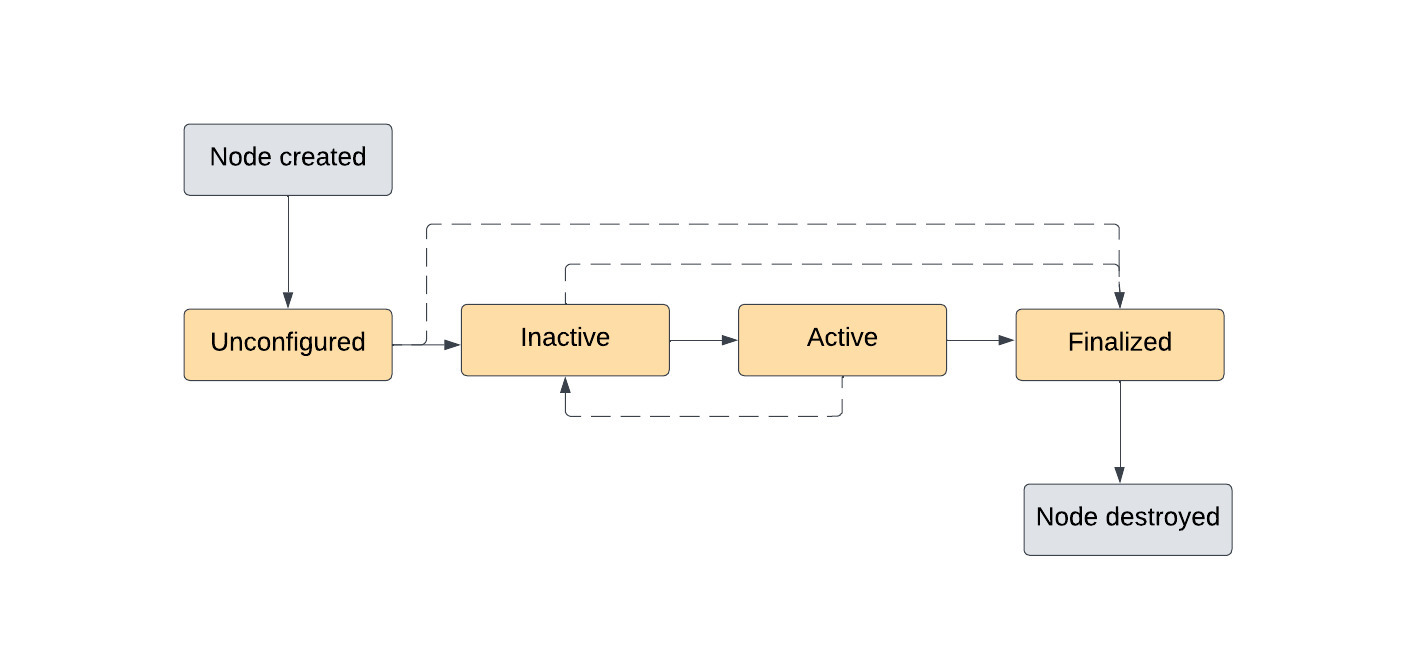
The primary states are:
- Unconfigured: The default state. The node exists as an object but has not allocated any resources or set up its communication channels.
- Inactive: The node has been configured and is ready, but it is not actively processing data. In this state, you can reconfigure parameters without affecting the rest of the system.
- Active: The node is running and performing all its tasks: publishing messages, responding to services, etc. This is the main operational state.
- Finalized: The terminal state before the node is destroyed.
This state machine allows a system supervisor to bring up, shut down, and reconfigure a complex network of nodes in an orderly fashion, which is critical for fault tolerance and system recovery.
Node Composition: The Best of Both Worlds
While running each node in a separate operating system process provides excellent isolation (a crash in one node doesn't bring down others), it comes with performance overhead. In ROS 2, you can use Composition to combine multiple nodes into a single process. This allows them to communicate more efficiently by passing data directly in memory, bypassing the networking stack entirely, while still maintaining the logical separation of nodes in your code. This gives you the modular code design of multiple nodes with the performance of a single, optimized program.
2.2 The Publisher-Subscriber Pattern (Topics)
The most common communication pattern in ROS is the Publisher-Subscriber model, implemented via Topics. This model is anonymous and asynchronous.
- A node that produces data publishes it to a named topic.
- A node that needs that data subscribes to that topic.
- There can be many publishers and many subscribers on a single topic.
Crucially, the publishing node has no knowledge of who is subscribing, and subscribers don't know who is publishing. They are completely decoupled. This makes for a very flexible and reconfigurable system.

Defining Messages (.msg files)
The data sent on topics is defined in .msg files. These are simple text files that define the data structure. For example, a custom message to report a robot's battery state might be:
# file: my_robot_interfaces/msg/BatteryState.msg
std_msgs/Header header
float32 voltage
float32 percentage
bool is_charging
This defines a message with a timestamp (header), a voltage, a percentage, and a boolean is_charging status. When you build your workspace, ROS 2 automatically generates the corresponding code (Python class or C++ struct) for you to use in your nodes.
Code Breakdown: Publisher and Subscriber
Below is a line-by-line explanation of the simple publisher from the src directory.
import rclpy
from rclpy.node import Node
from std_msgs.msg import String

class SimplePublisher(Node):
    def __init__(self):
        # 1. Initialize the Node with a name
        super().__init__('simple_publisher')

        # 2. Create a publisher.
        #    Args: message type, topic name, and QoS "history depth"
        self.publisher_ = self.create_publisher(String, 'chatter', 10)

        # 3. Create a timer to trigger the callback every 1.0 second
        self.timer = self.create_timer(1.0, self.timer_callback)
        self.get_logger().info('Publisher has been started.')

    def timer_callback(self):
        # 4. Create a message object
        msg = String()
        msg.data = f"Hello World: {self.get_clock().now()}"

        # 5. Publish the message
        self.publisher_.publish(msg)
        self.get_logger().info(f'Publishing: "{msg.data}"')

def main(args=None):
    # 6. Initialize the rclpy library
    rclpy.init(args=args)

    # 7. Create an instance of the node
    simple_publisher = SimplePublisher()

    # 8. "Spin" the node, which allows it to process callbacks
    rclpy.spin(simple_publisher)

    # 9. Clean up when spin is interrupted (e.g., by Ctrl+C)
    simple_publisher.destroy_node()
    rclpy.shutdown()
The rclpy.spin() function is the heart of a ROS 2 node. It enters a loop, waiting for and executing any pending work, such as a timer firing or a message arriving on a subscribed topic.
2.3 The Service (Request-Response) Pattern
While topics are great for streaming data, they aren't suitable for remote procedure calls (RPCs) where you need a direct, two-way exchange. For this, ROS provides Services. A service has two parts: a request and a response. One node acts as a service server, and another acts as a service client.
Synchronous vs. Asynchronous Clients
A key decision when using a service is whether the client should be synchronous or asynchronous.
- Synchronous: The client sends a request and blocks, waiting until the server sends a response. This is simpler to program but can freeze your node if the service takes a long time.
- Asynchronous: The client sends a request and immediately returns a "future" object. It can continue doing other work. It can periodically check if the future is complete or attach a callback function that will be executed when the response arrives. This is more complex but far more efficient.
The example in simple_service_client.py simulates a synchronous call by using rclpy.spin_until_future_complete.
2.4 Actions: For Long-Running, Preemptible Tasks
What happens when a task takes a long time and you need to monitor its progress or maybe cancel it? A service is a poor choice because it would block for too long. A topic doesn't provide feedback or a final result. This is the exact problem that Actions are designed to solve.
An Action is the most complex communication type, perfect for goal-oriented, long-running behaviors like:
- "Navigate to the kitchen."
- "Rotate the robot 360 degrees."
- "Pick up the red cube."
The client can also send a cancel request at any time. This multi-part, non-blocking communication makes actions the ideal choice for any robotic task that isn't instantaneous.
2.5 ROS 2 CLI: Introspection and Debugging
A deep understanding of the ROS 2 command-line interface (CLI) is essential for debugging. It allows you to inspect every part of a running ROS system.
ros2 node list: Lists all active nodes.ros2 node info <node_name>: Shows a node's publishers, subscribers, services, and actions.ros2 topic list: Lists all active topics.ros2 topic echo <topic_name>: Prints the full message data being published to a topic in real time.ros2 topic hz <topic_name>: Measures the publishing frequency of a topic.ros2 topic pub <topic_name> <msg_type> '<args>': Publishes a single message to a topic from the command line.ros2 service list: Lists all active services.ros2 service call <service_name> <service_type> '<args>': Calls a service from the command line.ros2 action list: Lists all active actions.ros2 action send_goal <action_name> <action_type> '<args>': Sends a goal to an action server.ros2 interface show <msg_type>: Shows the fields of a message, service, or action type.ros2 graph: A powerful tool that can provide a text-based description of the graph connections. This output can be redirected to generate a visual diagram.