Chapter 1: Introduction to ROS 2
Chapter 1: Introduction to ROS 2
Objective: Understand the motivation behind ROS 2, its core architectural principles, and its fundamental importance in modern robotics.
1.1 What is ROS and Why Use It?
The Robot Operating System (ROS) is not a traditional operating system. It doesn’t replace Windows, macOS, or Linux. Instead, it is a meta-operating system: a flexible and powerful framework for writing robot software that runs on top of a host OS. ROS provides a collection of tools, libraries, and conventions that aim to simplify the overwhelmingly complex task of creating robust and versatile robot behavior across a wide variety of robotic platforms.
Think of ROS as the nervous system and middleware that holds a robot's software together. A modern robot is an intricate system of sensors (eyes, ears, touch), actuators (muscles, motors), and multiple computers for decision-making. ROS provides a standardized, language-agnostic way for all these components to communicate seamlessly, from low-level motor control signals to high-level artificial intelligence and environmental perception.
The core philosophy of ROS is to foster a collaborative, open-source ecosystem. It achieves this through several key principles:
- Peer-to-Peer Communication: Nodes in ROS connect directly with each other, promoting a decentralized and resilient architecture (especially in ROS 2).
- Tools-Based Approach: ROS is not a monolithic library but a collection of hundreds of independent command-line and graphical tools for visualization, simulation, debugging, and more.
- Language Independence: ROS nodes can be written in C++, Python, and other languages, allowing developers to use the best language for a given task.
- Thin and Modular: The framework encourages writing small, single-purpose programs (nodes) that can be combined and reused in complex ways, rather than creating one giant, unmanageable program.
A Concrete Example: The Warehouse Robot
To understand the power of ROS, consider an Autonomous Mobile Robot (AMR) in a large warehouse. Its job is to navigate to a specific shelf, retrieve a product, and bring it to a packing station.
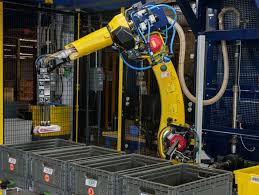
A simplified ROS-based software architecture for this robot would look like this:
lidar_driver_node: A C++ node that communicates with the robot's 2D LiDAR sensor, publishing scan data to the/scantopic.camera_driver_node: Another node that publishes images from the robot's camera to the/image_rawtopic.odometry_node: A node that reads from the wheel encoders to estimate the robot's movement, publishing position updates to the/odomtopic.slam_toolbox_node: A pre-built ROS package that subscribes to/scanand/odomto build a map of the warehouse (/maptopic) and continuously locate the robot within it.nav2_node: The core navigation stack. It subscribes to the map and the robot's position and accepts a goal location. It generates velocity commands (/cmd_veltopic) to drive the robot, avoiding obstacles found in the sensor data.motor_controller_node: A low-level node that subscribes to/cmd_veland translates these velocity commands into the specific electronic signals needed to drive the robot's wheels.task_supervisor_node: A Python node that communicates with the warehouse management system. When it receives an order, it tellsNav2the goal location. Once the robot arrives, this node might command a robotic arm to pick the item.
Without ROS, a developer would have to write the complex, multi-threaded communication logic to connect all these components manually. With ROS, each component is a small, manageable program, and the communication between them is handled by the framework.
1.2 From ROS 1 to ROS 2: The Need for Change
ROS 1, first released in 2007 at the robotics incubator Willow Garage, was a groundbreaking success that fueled a decade of research. However, it was designed for a single research robot (the PR2) in a lab environment. As robotics expanded into commercial products, multi-robot fleets, and real-world scenarios, the limitations of ROS 1 became critical.
The Centralized ROS 1 Architecture
The core of a ROS 1 system was the ROS Master (roscore). Every node had to register with the Master at startup. The Master acted as a DNS for the entire system, telling nodes how to find each other.
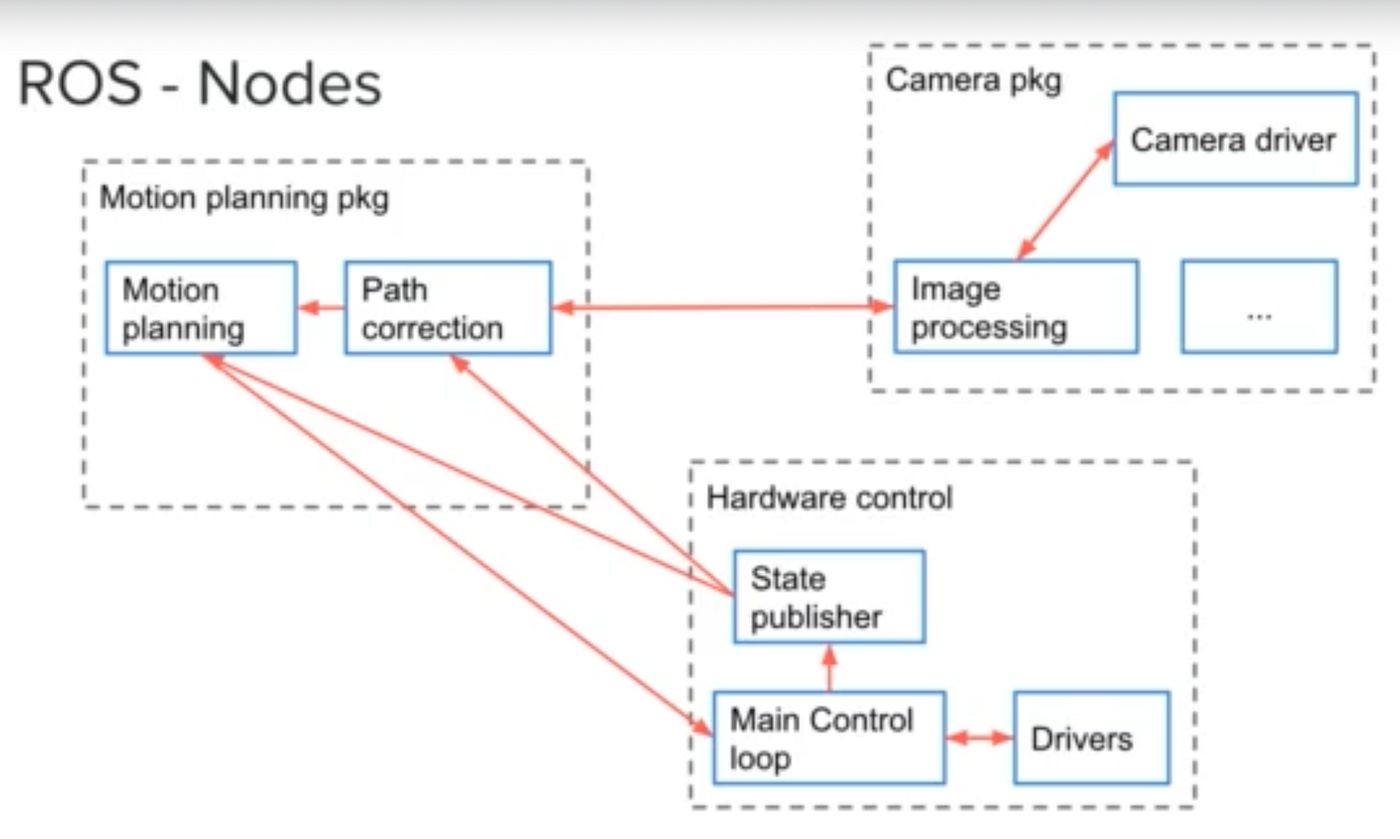

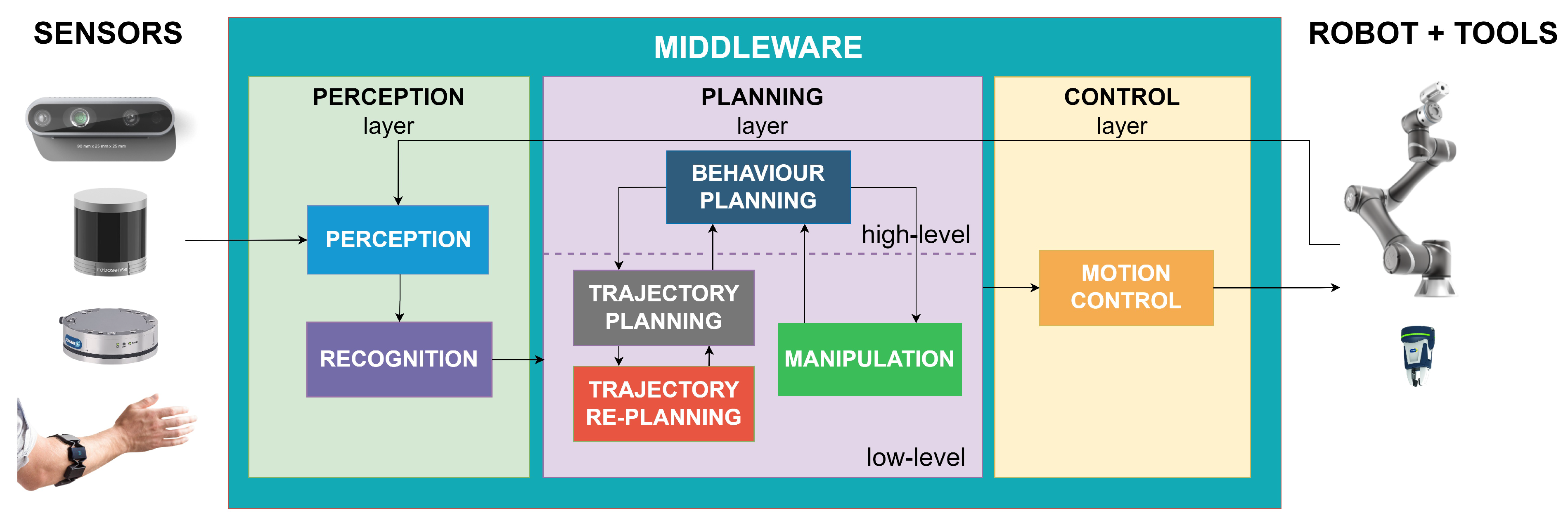
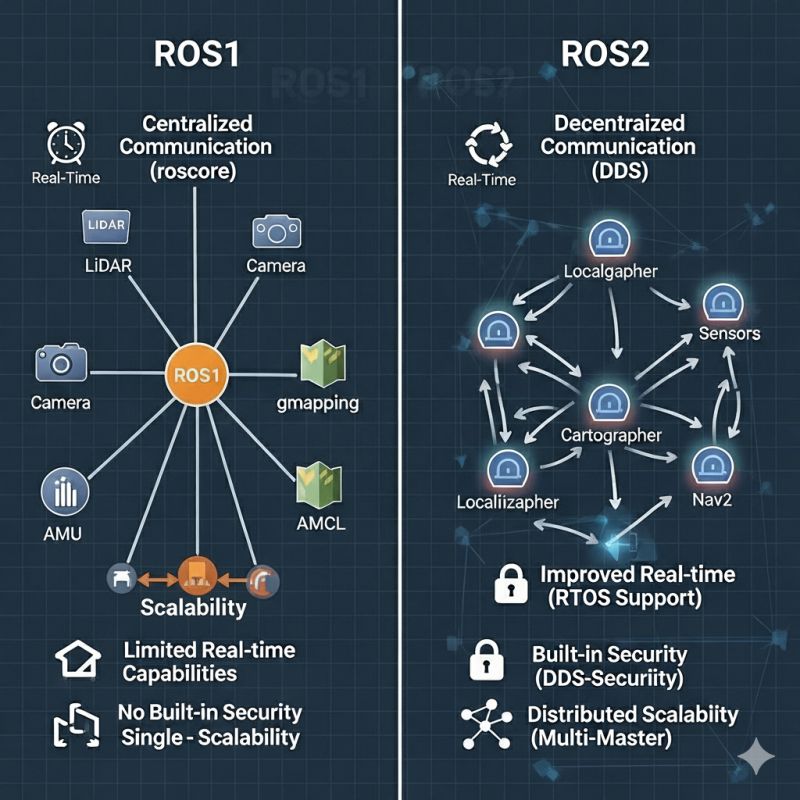
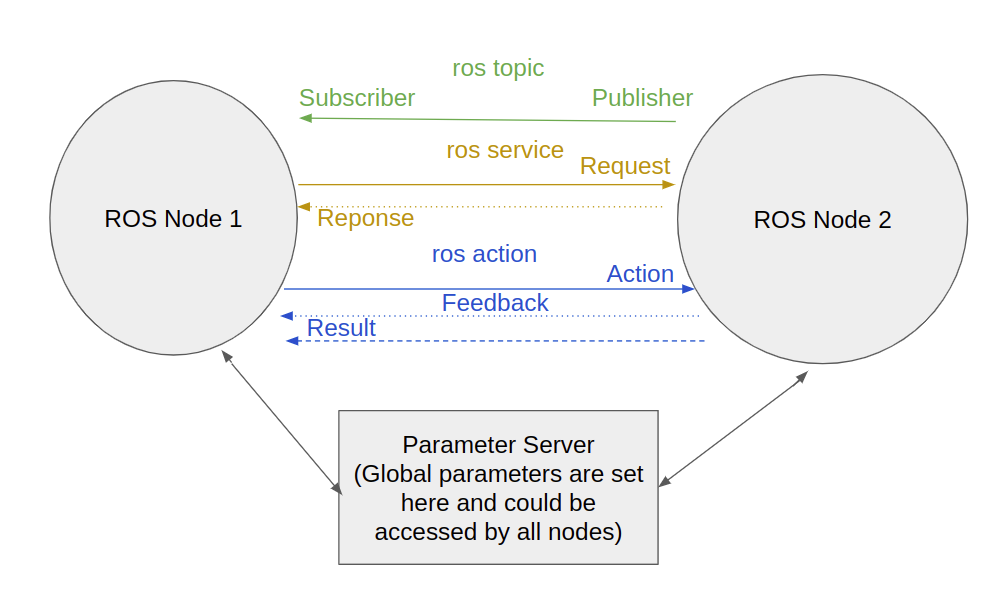 A simplified diagram showing how ROS nodes communicate. In ROS 1, a central Master (not shown) would be required for the initial discovery.
This centralized design led to several problems:
- Single Point of Failure: If the computer running the ROS Master crashed or lost network connectivity, no new nodes could start, and the entire system could not reconfigure itself.
- No Real-time Guarantees: Communication relied on a standard TCP/IP network protocol (TCPROS). This protocol is reliable but offers no guarantees about when data will arrive, making it unsuitable for time-critical control loops where a millisecond's delay can cause instability.
- Poor Network Performance: In environments with unreliable WiFi, ROS 1's reliance on persistent TCP connections could lead to significant lag and instability as connections dropped and were re-established.
- Lack of Security: ROS 1 had no built-in security. Any device on the network could publish malicious commands (e.g., telling the robot to drive at full speed into a wall) or listen in on sensitive sensor data. There was no authentication or encryption.
The ROS 2 Revolution
ROS 2 was designed from the ground up to be an industrial-grade framework. It addresses every key limitation of ROS 1:
- Decentralization: ROS 2 completely eliminates the Master. Nodes use a standardized discovery protocol to find each other automatically, making the system far more resilient and suitable for multi-robot fleets.
- Real-time Performance: It replaces the custom TCP protocol with the Data Distribution Service (DDS), an industry standard for real-time, mission-critical data exchange.
- Robust Security: ROS 2 incorporates a comprehensive security system (SROS2) providing encryption, authentication, and access control for all communication.
- Platform Flexibility: It offers first-class support for Linux, Windows, and macOS, as well as support for small, embedded microcontrollers through the Micro-ROS project.
1.3 DDS (Data Distribution Service): The Middleware Powering ROS 2
The most significant architectural change in ROS 2 is the adoption of DDS as its core communication middleware. DDS is not just a ROS feature; it is an open international standard from the Object Management Group (OMG), the same consortium that manages standards like UML and CORBA. It is used in mission-critical systems like air traffic control, medical devices, and financial trading.
At its core, DDS creates a "Global Data Space." Think of it as a shared, virtual database that all participants (nodes) can access. A node doesn't need to know where other nodes are; it simply writes data to a named "Topic" in this global space or reads data from a Topic it's interested in.
 In ROS 2, nodes discover each other directly through the DDS middleware, eliminating the central point of failure.
This architecture is made possible by the DDS Real-Time Publish-Subscribe (RTPS) wire protocol, which handles the discovery and data negotiation between participants. The true power of DDS for robotics lies in its Quality of Service (QoS) policies. These are tunable parameters that allow developers to precisely configure how data is handled.
Key QoS Policies for Robotics:
- Reliability:
BEST_EFFORT: Like UDP. The publisher sends the data, but doesn't check if it was received. Perfect for high-frequency sensor data (like a camera feed) where dropping a single message is acceptable.RELIABLE: Like TCP. Guarantees that data is delivered. Essential for critical commands, like robot movement instructions or goal positions.
- Durability:
VOLATILE: Subscribers will only receive data that is published after they subscribe.TRANSIENT_LOCAL: The publisher will store the last published message. When a new subscriber joins, it immediately receives the last saved message. This is incredibly useful for data that doesn't change often, like a map of the environment or the robot's configuration.
- Deadline: A contract that a publisher must send data at a minimum frequency. If it fails to do so, the system is notified. This can be used as a safety mechanism to detect if a critical node has crashed.
- Lifespan: Specifies how long a piece of data is considered valid. For example, a
/cmd_velmessage might have a short lifespan, so the robot stops if it doesn't receive fresh commands.
Because DDS is a multi-vendor standard, ROS 2 can use different DDS implementations (e.g., eProsima Fast DDS, RTI Connext, Eclipse Cyclone DDS) by changing a configuration setting, allowing users to select the best implementation for their specific needs.
1.4 Installation and Setup
This section provides a conceptual overview of the installation process. For a detailed, step-by-step guide, you must follow the quickstart.md document.
Supported Platforms: ROS 2 provides different levels of support for various operating systems. Ubuntu is the most common platform for development.
- Tier 1 (Primary): Ubuntu 22.04 LTS
- Tier 2 (Secondary): Windows 10/11, macOS
- Tier 3 (Experimental): Other Linux distributions
Installation Steps:
- Install ROS 2 Humble/Iron: The installation process typically involves adding the official ROS 2 package repository to your system's sources and then installing a core package. You will generally choose between:
ros-<distro>-desktop: Includes ROS, RViz2, demos, tutorials, and Gazebo.ros-<distro>-base: A more minimal installation without GUI tools.
- Source the Setup File: After installation, you must "source" the ROS 2 setup file in your terminal. This command,
source /opt/ros/humble/setup.bash, configures your shell environment by setting variables likePATHandPYTHONPATH. This allows your terminal to find and execute ROS 2 commands and run your Python or C++ nodes. It's standard practice to add this line to your~/.bashrcfile so it runs automatically with every new terminal. - Verify Installation with the 'Talker-Listener' Demo: This simple demo is the "Hello, World!" of ROS. It confirms that your installation and DDS-based communication are working correctly.
- You open two separate terminals. Both must have the ROS 2 environment sourced.
- In the first, you run a Python node that continuously publishes "Hello World" messages to a topic named
/chatter:ros2 run demo_nodes_py talker - In the second, you run a Python node that subscribes to
/chatterand prints any message it receives:ros2 run demo_nodes_py listener
[Image: A screenshot showing two terminals side-by-side. The left terminal shows the output of the 'talker' node publishing messages. The right terminal shows the output of the 'listener' node receiving those messages.]
If you see the listener printing the talker's messages, it means the two nodes successfully discovered each other over the network via DDS and are passing information. Your ROS 2 nervous system is alive.
1.5 ROS 2 Ecosystem and Tools
ROS 2 is far more than just middleware. It's a comprehensive ecosystem of tools designed to make robotics development faster, safer, and more collaborative.
Core Tools
- rclpy/rclcpp: The client libraries for Python and C++ respectively. These are the foundation upon which all ROS 2 nodes are built.
- ros2 CLI: A powerful command-line interface for introspecting and interacting with running ROS systems. You can list active nodes, publish messages to topics, and inspect the entire ROS graph without writing a single line of code.
- RViz2: The visualization framework. It's a 3D viewer where you can see your robot, its sensors, maps, paths, and debug information all in one place.
- Gazebo: A high-fidelity physics simulator. It simulates robots and their environments, allowing you to test your code before deploying it to real hardware.
- Launch System: ROS 2 provides a launch system that allows you to start multiple nodes with a single command, configured exactly as you want them.
Packages and Rosdep
The true power of ROS emerges from its massive ecosystem of open-source packages. There are pre-built packages for nearly every common robotic task:
- navigation2: Full autonomous navigation stack with SLAM, path planning, and obstacle avoidance.
- MoveIt 2: Motion planning and manipulation framework for robotic arms and grippers.
- TensorFlow / PyTorch: Deep learning frameworks easily integrated with ROS.
- Isaac Sim: NVIDIA's physics-accurate simulation platform with integrated AI training capabilities.
The rosdep tool automatically resolves and installs these dependencies across different Linux distributions.
1.6 The ROS 2 Development Workflow
A typical ROS 2 developer's workflow follows these steps:
- Design: Sketch out the nodes you'll need and what topics they'll communicate over.
- Define Interfaces: Create
.msgand.srvfiles describing the data structures. - Build: Use
colconto compile your packages. - Test Locally: Run your nodes and use RViz and the
ros2CLI tools to debug. - Simulate: Deploy in Gazebo to test complex behaviors in a safe, virtual environment.
- Deploy: Move your code to real hardware once you're confident.
1.7 Challenges and the Path Forward
While ROS 2 is a massive improvement, it's not a silver bullet. Modern robotics faces challenges that even a perfect middleware can't fully solve:
- Real-time Computing: Ensuring that time-critical code (like a motor control loop) executes on a deterministic schedule. Micro-ROS addresses some of these needs for embedded systems.
- Distributed Computing: As robots become more complex, they may span multiple computers (e.g., an onboard computer for immediate control and a cloud server for heavy computation). Coordinating these is an open problem.
- AI and Deep Learning Integration: While it's possible to run deep learning models in ROS 2, seamlessly integrating them into a real-time system remains challenging.
- Human-Robot Interaction: Making robots safe, predictable, and easy for non-experts to work with is an evolving field.
Summary
ROS 2 is the modern standard for robotics development. It provides a decentralized, real-time, and secure middleware that abstracts away the complexity of multi-computer communication. By using a standardized communication protocol (DDS), it enables developers to write modular, reusable code that can be deployed across different platforms and robotic systems.
In the following chapters, we'll dive deep into how to use ROS 2, starting with fundamental communication patterns and progressing to complex multi-agent systems, simulation, and AI integration.